02. Physical Hardware & Virtualization Architecture
Platform Standard: Bare-Metal Hypervisor & Host Resource Fencing
Host OS: Proxmox VE 8.x (Debian 12 Bookworm / Linux Kernel 6.8+)
Physical Compute: Intel Core i5 Mini PC (x86-64 Architecture)
Operational Profile: 24/7 Continuous Operation (~15W Idle / ~35W Peak)
1. Hardware Specification & Compute Profile
The sovereign on-premise foundation runs on an energy-efficient Mini PC engineered for continuous 24/7 reliability, minimal thermal dissipation, and silent acoustic operation:
| Component | Hardware Specification | Architectural Role | Operational SLA |
|---|---|---|---|
| Processor (CPU) | Intel Core i5 (4 Physical Cores / 8 Threads @ 3.10GHz) | Virtualized compute execution for Kubernetes scheduler, container runtimes, and OCR pipelines. | Host CPU type pass-through for AES-NI and virtualization instructions. |
| Physical Memory (RAM) | 16,384 MB (16 GB) DDR4 Non-ECC (Single Channel) | Hard-budgeted between hypervisor kernel daemons and the primary Kubernetes workload VM. | Strictly fenced memory boundaries; zero unconstrained ballooning. |
| Primary Storage (Tier 1) | 256GB M.2 NVMe PCIe SSD | High-IOPS low-latency pool for Proxmox OS, K3s etcd state, and CloudNativePG PostgreSQL tables. | Random I/O > 150,000 IOPS; TRIM/discard enabled. |
| Secondary Storage (Tier 2) | 1TB 2.5" SATA Mechanical HDD (5400 RPM) | High-capacity bulk storage for Paperless document archives, digital media, and local VM snapshots. | Sequential throughput ~120MB/s; formatted ext4. |
| Network Interface (NIC) | 1x 1Gbps Realtek RTL8111 PCI Express Gigabit Ethernet | Direct physical uplink to residential local area network (LAN). | Line-rate gigabit forwarding; hardware checksum offload. |
| Power Consumption | ~15W Idle / ~35W Peak Load (12V DC Adapter) | Ultra-low operational energy draw (~₹400 / ~$5.00 USD per month in electricity). | Sustained 24/7 operation with passive heat dissipation. |
2. Hypervisor Memory Fencing & Resource Budget
Running a production-grade Kubernetes cluster on a 16GB host requires disciplined memory fencing. An unconstrained cluster will inevitably trigger an Out-Of-Memory (OOM) condition on the physical hypervisor, leading to host kernel panics, unresponsive SSH daemons, and storage superblock corruption.
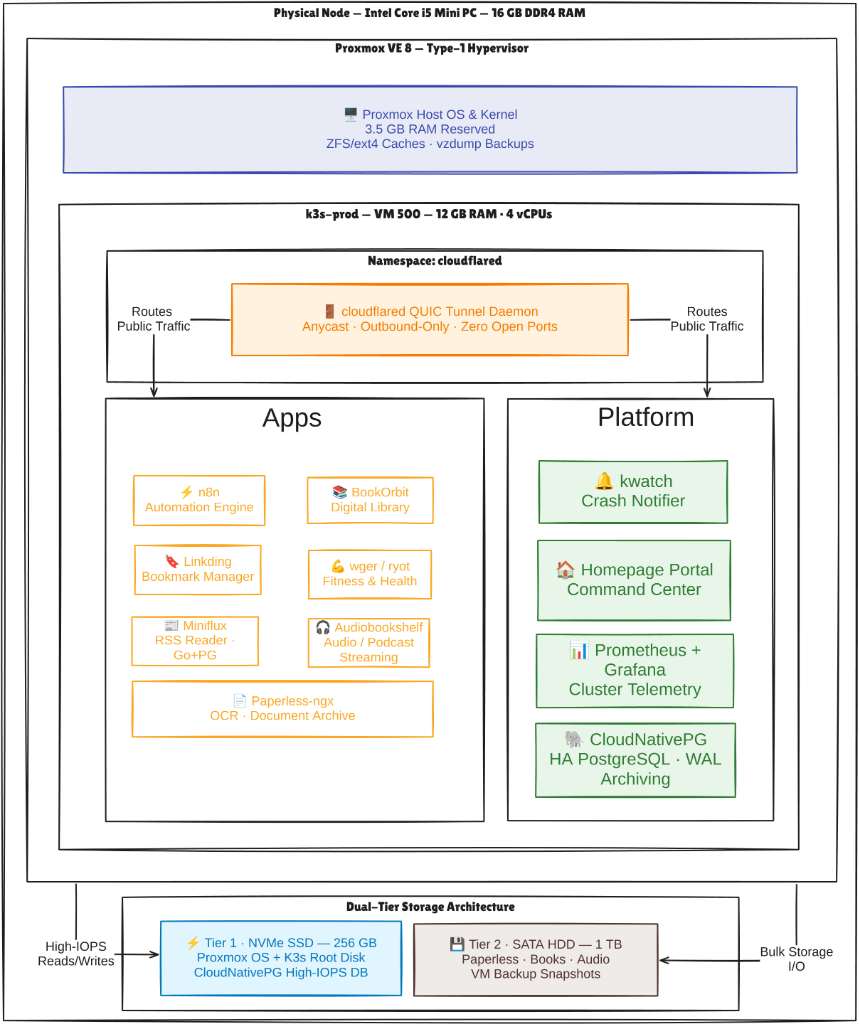
Strict Memory Allocation Breakdown
| Memory Domain | Allocated Capacity | Percentage of Host RAM | Operational Responsibilities & Headroom |
|---|---|---|---|
k3s-prod Virtual Machine (VM 500) |
12,288 MB (12.0 GB) | 75.0% | Dedicated to all containerized workloads, K3s system daemons, CloudNativePG database, and Paperless OCR workers. Current active consumption is ~4.5GB, maintaining a >60% memory headroom buffer for indexing spikes. |
| Proxmox VE Host OS (Reserved) | 3,500 MB (3.5 GB) | 21.3% | Reserved exclusively for Debian 12 base kernel, KVM hypervisor processes, QEMU overhead, network bridging, and in-memory buffer cache for vzdump backup compression. |
| Host Emergency Safety Buffer | ~596 MB (0.6 GB) | 3.7% | Unallocated physical margin preventing host kernel starvation during heavy burst I/O or background storage flushes. |
Hypervisor Kernel Tuning
To guarantee that the hypervisor never aggressively swaps host daemons to mechanical disk during high load, the following kernel parameters are codified on the Proxmox host:
# /etc/sysctl.d/99-pve-fencing.conf
# Discourage aggressive swapping to preserve hypervisor responsiveness
vm.swappiness = 10

# Throttle dirty page writeback buffers
vm.dirty_ratio = 10
vm.dirty_background_ratio = 5

# Protect Proxmox cluster daemons from OOM invocation
vm.overcommit_memory = 0
3. Storage Virtualization & Drive Mapping
To prevent disk I/O starvation, the host enforces a strict hardware boundary between high-IOPS flash storage and bulk mechanical storage:
Physical Host (Proxmox VE 8)
├── /dev/nvme0n1 (256GB NVMe SSD - Tier 1 Hot Storage)
│   ├── pve-root (20GB ext4)            --> Proxmox Base OS & Hypervisor Binaries
│   └── local-lvm (LVM-Thin Pool)       --> High-IOPS Virtual Disks
│       └── vm-500-disk-0 (50GB raw)    --> k3s-prod VM Root Virtual Disk (ext4)
│
└── /dev/sda (1TB SATA Mechanical HDD - Tier 2 Cold Storage)
    └── backup-hdd (/mnt/hdd ext4)      --> High-Capacity Bulk Directory Storage
        ├── dump/                       --> vzdump Compressed VM Backup Snapshots (.vma.zst)
        └── vm-500-disk-1 (250GB raw)   --> Attached to k3s-prod, mounted at /mnt/data
Storage Virtualization Configuration:
- Disk Bus Controller:
virtio-scsi-singlewith dedicated IOThreads enabled, allowing the QEMU disk process to execute asynchronous I/O independently from the VM's main vCPU execution threads. - SSD Emulation & Discard:
discard=on(TRIM pass-through) enabled onvm-500-disk-0. Deleted blocks inside Kubernetes immediately release physical storage in the underlying LVM-thin pool. - Cache Policy:
cache=nonefor direct write-through to disk, preventing double-caching penalties between host RAM and guest OS page cache.
4. Virtual Networking & Linux Bridge Architecture
The hypervisor manages host and guest traffic through a standard Linux bridge (vmbr0):
Physical Network (192.168.1.0/24 LAN)
                   |
     [ Physical NIC: enp2s0 ]
                   |
       [ Linux Bridge: vmbr0 ] (192.168.1.100/24)
         |               |
         |               +--> [ Virtual Tap: tap500i0 ]
         |                            |
         |                   [ Guest NIC: eth0 ] (192.168.1.105/24)
         |                   inside k3s-prod Virtual Machine
         |
         +--> [ Tailscale Encrypted Overlay Interface: tailscale0 ] (100.108.178.93)
- Driver: VirtIO Network Adapter (
virtio), delivering multi-queue gigabit throughput with low CPU overhead. - VLAN Support: Default configuration operates in untagged mode (
tag=-1), with 802.1Q trunking ready for future network segmentation. - Zero Inbound NAT: No router ports are mapped to
vmbr0or192.168.1.105. Ingress is managed exclusively via outbound Cloudflare tunnels and Tailscale overlays.
5. Host Security Hardening & Isolation
- Root Password SSH Disabled: Direct root login via password is strictly blocked in OpenSSH configuration (
PermitRootLogin prohibit-password). - Dedicated Automation User: Automated operations execute as the unprivileged
devopsuser with scopedsudoersprivileges. - Proxmox Firewall: Hypervisor administration interface (
8006) is restricted to the local management subnet and authenticated Tailscale nodes. - Kernel Livepatching: Automated security updates are scheduled via Debian
unattended-upgrades, ensuring security patches apply without manual intervention.