Phase 4: Hypervisor Consolidation & K3s-Prod Resizing
| Milestone Attribute | Engineering Specification |
|---|---|
| Phase Scope | Virtual Machine Decommissioning, Compute Consolidation & Storage Expansion |
| Target Infrastructure | Proxmox VE 8.x Hypervisor (192.168.1.3), k3s-prod (VM 500) |
| Primary Code Paths | infrastructure/on-prem/, configuration/inventory/group_vars/all/vars.yml |
| Relevant Decisions | ADR-001, ADR-013, ADR-015, ADR-016 |
| Operational Status | Production Verified (Platform v3.0.0) |
1. Executive Summary & Objective
Phase 4 executes the physical hardware consolidation on the Mini PC's Proxmox VE hypervisor. It permanently terminates the idle Academy Zone virtual machines and the legacy ops-center bastion VM, reclaiming physical compute cores, RAM, and NVMe disk blocks.
Once reclaimed, these resources are consolidated into the single production workload engine: k3s-prod (VMID 500), upgrading it to:
- 12,288 MB (12 GB) DDR4 RAM (expanded from 8GB).
- 4 vCPUs (expanded from 2 cores).
- Secondary VirtIO SCSI Mount mapping the physical 1TB SATA mechanical HDD directly to the VM for cold media and document storage.
2. Resource Economics: Eliminating Memory Over-Commitment
Prior to consolidation, the cumulative defined RAM across all virtual machines was:
$$\text{Lab VMs (7.5 GB)} + \text{ops-center (2.0 GB)} + \text{k3s-prod (8.0 GB)} = 17.5\text{ GB Allocated}$$
On a physical 16GB Mini PC, this over-commitment meant that running lab workloads simultaneously with k3s-prod caused host swap thrashing and risked hypervisor instability.
Post-consolidation benefits:
- Decommissioning the 5 lab VMs reclaimed ~7.5GB defined RAM and ~40GB NVMe storage.
- Decommissioning
ops-centerreclaimed 2GB RAM, 2 vCPUs, 20GB NVMe, and 250GB virtual disk. - Dedicating 12GB to
k3s-prodprovides production workloads with 75% of the machine's capacity, creating an ~8.3GB active buffer for Paperless OCR tasks and database queries. - The remaining 3.5GB host reserve guarantees stability for the Proxmox Debian kernel and high-throughput
vzdumpbackup compression.
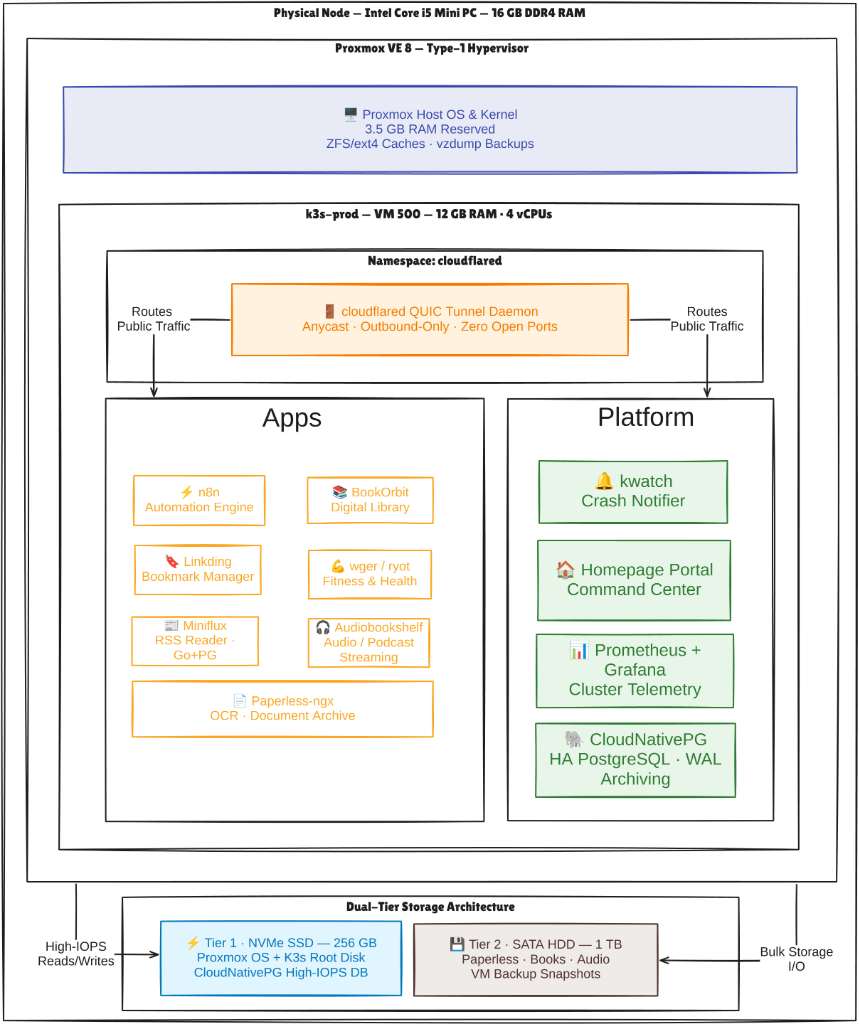
3. Physical Node Consolidation Architecture
Host Virtualization Topology:
[ Physical Mini PC: Intel Core i5 | 16GB DDR4 RAM ]
  │
  ├── [ Proxmox VE 8.x Hypervisor Reserve: 3.5GB RAM ]
  │     ├── Linux Kernel & KVM Daemons
  │     └── ZFS / ext4 ARC & vzdump Engine
  │
  └── [ Consolidated Production VM: k3s-prod (VM 500) ]
        ├── Compute: 4 vCPUs (Dedicated)
        ├── Memory : 12,288 MB RAM (75% Host Capacity)
        ├── Tier 1 (Hot) : 50GB NVMe Root (OS & etcd)
        └── Tier 2 (Cold): 800GB SATA HDD Mount (/mnt/hdd)
4. Technical Execution Details
1. Pre-Flight Block-Level Snapshot (k3s-prod)
Prior to resizing, a block-level snapshot of the production VM was written to local backup storage:
ssh [email protected] "vzdump 500 --storage backup-hdd --mode snapshot --compress zstd"
2. MinIO Data Evacuation from ops-center
Before stopping VM 900 (ops-center), all database backups and artifacts were pulled to local storage:
mkdir -p ~/homelab-backups/minio-export
# Synchronize all data from ops-center MinIO container
aws --endpoint-url http://100.87.130.97:9000 s3 sync s3:// ~/homelab-backups/minio-export/
3. Decommissioning Obsolete Virtual Machines
With state verified offsite and backups secured, the legacy VMs were permanently stopped and purged:
# Purge Academy Zone LXC Gateway (100)
ssh [email protected] "pct stop 100 2>/dev/null || true; pct destroy 100 --purge 2>/dev/null || true"

# Purge Academy Zone VMs (200, 210, 220, 221)
for vmid in 200 210 220 221; do
  ssh [email protected] "qm stop $vmid 2>/dev/null || true; qm destroy $vmid --purge --skiplock 2>/dev/null || true"
done

# Purge ops-center VM (900)
ssh [email protected] "qm stop 900 2>/dev/null || true; qm destroy 900 --purge --skiplock 2>/dev/null || true"
4. Applying Hardware Resizing via Terraform
In infrastructure/on-prem/, the updated k3s-prod allocation was applied:
cd infrastructure/on-prem

export AWS_ACCESS_KEY_ID="<OCI_CUSTOMER_ACCESS_KEY>"
read -sp "Enter OCI Secret Key: " AWS_SECRET_ACCESS_KEY && export AWS_SECRET_ACCESS_KEY

terraform apply -target=module.k3s_prod
Proxmox performed a graceful VM shutdown, adjusted CPU cores to 4, expanded RAM to 12,288MB, attached the secondary virtual disk from backup-hdd, and rebooted the guest.
5. Formatting & Mounting the 1TB Cold HDD
Inside k3s-prod, the secondary drive was formatted with ext4 and mounted persistently:
ssh [email protected]

# Format secondary drive
sudo mkfs.ext4 -L cold-storage /dev/sdb

# Configure persistent fstab mount
sudo mkdir -p /mnt/hdd
echo "LABEL=cold-storage /mnt/hdd ext4 defaults,noatime 0 2" | sudo tee -a /etc/fstab
sudo mount -a

# Create application-specific directories
sudo mkdir -p /mnt/hdd/{paperless,books,media,backups}
sudo chown -R 1000:1000 /mnt/hdd
5. Verification & Quality Assertions
1. Proxmox Clean-State Audit
ssh [email protected] "qm list"
# Output: Strictly VM 500 (k3s-prod) is present. All legacy VMIDs are verified removed.
2. Node Resource Capacity Verification
ssh [email protected] "free -h && nproc"
# Output: total memory reports 11G/12G; nproc reports 4 cores.
3. Secondary Storage Mount Verification
ssh [email protected] "df -h /mnt/hdd"
# Output: Mounted on /mnt/hdd with ~800GB available capacity on ext4.
6. Exit Gate & Phase Transition
With hypervisor resources consolidated, memory strictly budgeted, and bulk storage mounted, the platform advanced to Phase 5: Cloudflare Edge Ingress & Container Registry Decoupling.